Stopfinder
- 4.4
- Rating
- 100.00K
- Installs
- Free
- Price

 Analysis by App-foxy
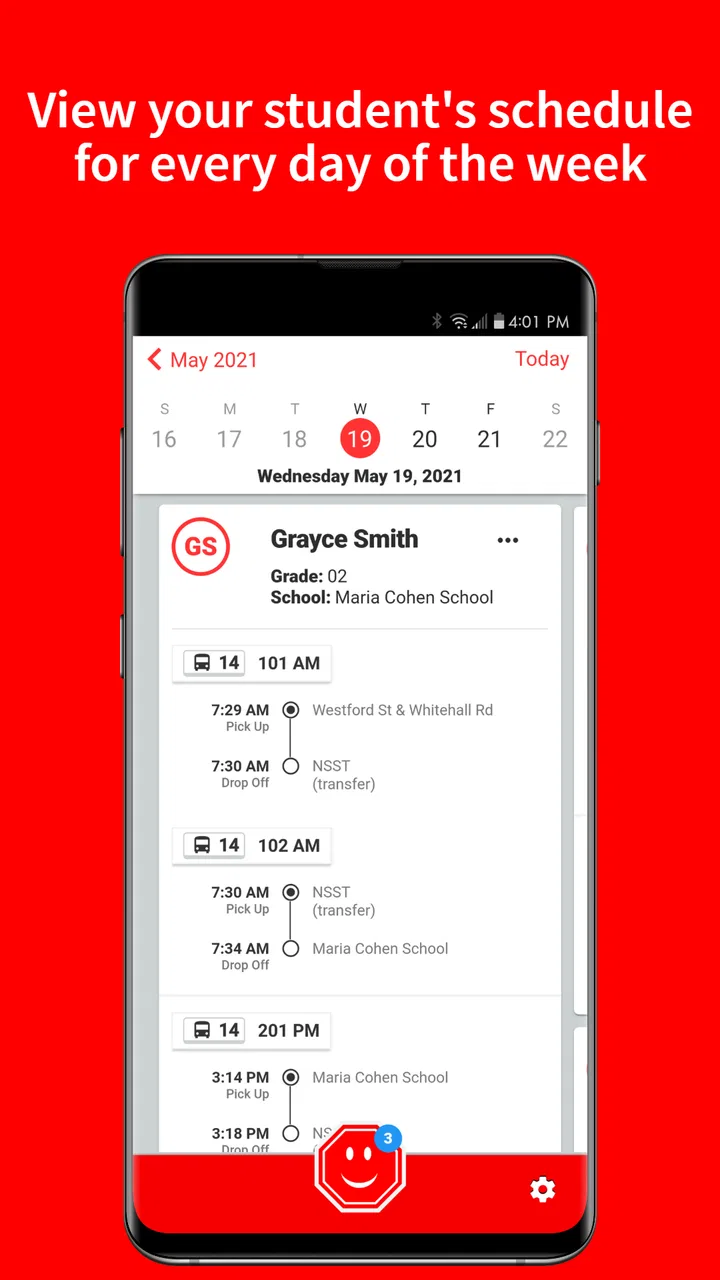
For families who depend on a school bus, the hardest part is often not the ride itself but the uncertainty around it. A child leaves home, the schedule can shift, and parents may need a quick way to check the planned stop without searching through messages or calling the transportation office. Stopfinder is an Education app from Transfinder Corporation that focuses on that narrow but useful problem: viewing a student’s daily bus stops and communicating with the transportation department.
I found its purpose refreshingly practical. It is not trying to become a complete school platform, a social network, or a general-purpose family organizer. Instead, it puts transportation information in one place for eligible families. That focus makes it easier to understand, although it also means the app’s value depends heavily on whether your school district uses the service and has connected your student’s information correctly.
The app is free, rated for Everyone, and has built a solid audience, with more than one hundred thousand installs. Its average rating is 4.4 from around 2,700 ratings, alongside roughly 1,200 written reviews. Those figures suggest that many families find the basic idea worthwhile, while the written feedback also reflects an important reality with school transportation apps: the experience can depend on the district’s setup as much as on the software itself.
You May Also Like

 Blood Strike: 2.5 Anniversary
Blood Strike’s Loadouts Turn Every Drop Into a Tactical Gamble
A close look at Blood Strike’s custom loadouts: how fast access to signature weapons reshapes its battle royale rhythm, rewards preparation, and narrows the gap between fights.

 Pandora - Music & Podcasts
Pandora’s Music Is Easy to Start, but Harder to Recover
Pandora’s strength is its low-effort path from a seed to a station. Its weak spot is how much confidence it asks you to place in connection, setup, and quiet recovery.

 8 Ball Pool
 Is Built on Rivalries, Rematches, and Routine
A close look at the rivalries, rematches, shared routines, and unanswered safety questions that turn a quick pool match into a persistent mobile community.

 Samsung Music
’s Quiet Strength Is Playing What You Already Own
Its reach comes less from spectacle than from dependable access to a personal library. That simplicity is both the app’s strongest retention engine and its ceiling.

 AccuWeather: Weather Radar
AccuWeather Review: A Quick, Clear Forecast for Everyday Decisions
For everyday plans, the best forecast is the one you can understand quickly. AccuWeather makes rain timing, radar, and local conditions easy to act on, with a few trade-offs.

 Hill Climb Racing
Why Hill Climb Racing Still Turns Crashes Into One More Run
A tiny car, a bumpy hill and one more upgrade: Hill Climb Racing keeps resurfacing because its simple chaos makes every near-miss feel personal.
More From Our News Desk
View All News


How Stopfinder feels in everyday use
I find Stopfinder works best when it becomes a calm, deliberate checkpoint rather than something the family opens only after a bus-day surprise. In this section, I’ll look at the small routines that make its student and transportation information easier to use responsibly, including how to avoid confusing a convenient reference with an urgent contact channel.
Quick checks are where the app makes the most sense
My preferred way to use Stopfinder is as a short, purposeful check rather than an app I leave open all day. Before a child gets ready for school, I can look at the assigned daily stop and confirm the transportation details that matter for that morning. That is more convenient than digging through an email thread or relying on a paper notice that may no longer reflect a change.
A realistic example is a weekday when a parent is working from home and another adult is taking the child to the bus. Instead of explaining the route from memory, the parent can open the app, review the student’s stop information, and pass along the relevant details. The benefit is small in a single moment, but it becomes meaningful when several people share responsibility for school drop-off and pickup.
The most useful habit is to check Stopfinder before the morning becomes rushed. Looking at the information while preparing backpacks and breakfast gives you time to notice an unexpected change or contact transportation without trying to solve everything at the curb. The app is less valuable as a last-second rescue tool if the account has not already been set up or the family has not learned where its information appears.
What the communication side changes
The connection with the transportation department is an important part of the experience. A bus question is often too specific for a general school portal, while a phone call can take longer than a parent wants to spend on a simple clarification. Having transportation-related communication in the same place as student stop information gives the app a clearer role than a basic timetable viewer.
I would use that channel for practical questions about a student’s assigned transportation details or for clarifying something that does not look right. I would not treat it as a replacement for urgent contact methods. If a child is waiting somewhere unsafe or there is an immediate emergency, the app should not be the only route you rely on.
There is also a useful trade-off here. Centralizing transportation communication can reduce scattered messages, but it creates a new expectation: families need to watch the app closely enough to notice replies or updates. If someone in the household is the main transportation contact, make sure that person is the one who regularly checks the account. Otherwise, information can be available without actually reaching the adult who needs it.
Speed expectations and the role of the connection
Stopfinder is built around information that should be quick to consult, not around long sessions or demanding visual content. In my view, that makes perceived speed less about powerful hardware and more about whether the account is ready, the school data is current, and the phone has a dependable connection. A simple transportation check should feel lightweight when those pieces are in place.
The first-use experience may feel slower than later checks because setup and account access require more attention than opening a familiar screen. That is normal for an app tied to student records, but it is worth preparing for before the first school morning. I would install it, sign in, and confirm the student information on a calm day rather than waiting until a bus is due.
One practical tip is to avoid judging the app during a single stressful morning if the problem is clearly related to account setup or district information. First confirm that the correct student is connected and that the displayed stop is the one your family expects. If the information itself is wrong, repeatedly reopening the app will not fix the underlying record; contacting the transportation department is the more sensible next step.
Heavy-use moments are short, but important
Most families will not use Stopfinder continuously. The demanding moments are likely to be concentrated around the start and end of the school day, especially when many parents check transportation information at similar times. That pattern matters because an app can feel perfectly adequate during a quiet afternoon but more frustrating when everyone is trying to confirm plans at once.
I appreciate that the app’s purpose does not encourage unnecessary background use. You open it when you need transportation information, review the relevant details, and close it. That should be easier on a phone’s battery and storage than apps designed around video, maps, constant messaging, or frequent media updates. Still, I would avoid assuming that low visual complexity guarantees identical behavior on every device or network.
For households managing several children, the real test is organization rather than raw speed. Before relying on the app, I would check how clearly each student can be distinguished and develop a simple routine: review one child’s information, then the next, rather than trying to remember everything from a hurried glance. This reduces the chance of mixing up stops, particularly when siblings attend different schools or have different transportation arrangements.
Stability and recovery after an interruption
Transportation information is most valuable when a parent can return to it after an interruption. A phone call, a child asking a question, or a weak connection can break the flow of a morning check. In that situation, I prefer a simple recovery routine: reopen the app, confirm that the account is still active, and look again at the student information before making a decision.
Because Stopfinder is connected to school transportation records, not every apparent problem is an app crash. A missing or unexpected stop may reflect an account association issue, a district update, or a communication gap. That distinction is important. If the app opens normally but the information looks wrong, report the issue to the transportation department instead of repeatedly reinstalling the app.
Reinstallation should be a later troubleshooting step, not the first response. It can create extra work for a parent who simply needs to get a child to the bus. I would first check the internet connection, close and reopen the app, and verify the account details. If the issue continues, use the transportation communication route or the district’s established contact method, keeping the description specific and including which student or stop appears affected.
Device requirements and practical limits
The current version is 3.1.5, and the app supports devices running Android 8.0 or later. That makes it accessible to many older phones, but families using an older device should still leave enough free storage for normal app updates and keep the operating system in a stable condition. Compatibility is only the starting point; an aging phone with a weak battery or unreliable connection can make any time-sensitive app feel less dependable.
Stopfinder should be a reasonable fit for a phone used mainly for calls, messages, school information, and everyday utilities. It is not the kind of app I would choose as a reason to upgrade a device by itself. If your phone struggles with basic apps, loses network access frequently, or has aggressive battery-saving settings, the problem may show up as delayed access or interrupted sessions rather than as a clear failure inside Stopfinder.
For that reason, I would make two small preparations. Keep the app updated through the normal device store process, and avoid testing it for the first time when the phone is nearly out of battery. Also, make sure the adult responsible for transportation can access the account from the device they actually carry in the morning. An app installed on a tablet at home is less useful if the person meeting the bus only has a phone.
Where it beats ordinary alternatives
The usual alternatives are paper notices, school-wide portals, email, phone calls, or informal family messages. Each has a weakness. Paper can become outdated, email can bury a transportation detail among unrelated school notices, and a general portal may require several steps before reaching bus information. A phone call gives personal assistance but is not always convenient for a quick confirmation.
Stopfinder’s advantage is its narrower focus. It gives transportation information its own place and links that information with communication to the transportation department. That is more useful than a generic calendar when the question is specifically “Where is this student’s daily stop?” or “Who should I contact about this transportation detail?”
It is not automatically better than every alternative. A school district’s main portal may be preferable if it combines transportation with attendance, grades, announcements, and emergency notices that your family already checks every day. Likewise, a direct conversation may be better when the situation is complicated or urgent. I see Stopfinder as a specialized companion, not a universal replacement for every school communication tool.
Who will benefit most from it
This app makes the most sense for parents and guardians whose children regularly use school transportation and whose district supports the service. It is especially useful for families with changing schedules, shared caregiving, multiple adults handling pickup, or a strong need to confirm details without making a call.
It can also help a parent who is new to a school district and does not yet have the transportation routine memorized. Instead of depending entirely on another family member’s memory, that parent has a dedicated place to review the student’s stop information. The value is practical rather than flashy: fewer assumptions, fewer scattered messages, and a clearer starting point when a question comes up.
I would be more cautious about recommending it to someone whose school does not use Transfinder’s transportation system, who rarely needs bus information, or who expects a full-featured school management app. In those cases, Stopfinder may add another login without solving a real problem. It is also not the right sole tool for emergency coordination, because transportation information and urgent safety communication are different needs.
Small workflow improvements that make a difference
My first recommendation is to set up the account before the first important use. Confirm the student association, review the displayed stop, and show the process to any other adult who may handle the bus. This turns the app from an unknown variable into a familiar reference point.
My second recommendation is to compare the app’s information with the family’s actual routine the first few times. Check the displayed stop against what the child has been told and against any official school communication. This is not about distrusting the app; it is about catching an account or record mismatch before it becomes a morning problem.
My third recommendation is to use the communication function with concise, useful messages. Include the student context and describe the transportation question directly instead of sending a vague note. Clear messages are easier for a transportation department to understand and more likely to produce a useful response than a long explanation that leaves the actual issue unclear.
A fourth useful practice is to decide who owns the daily check in your household. When several adults assume someone else is watching transportation updates, information can be missed even when the app works correctly. Assigning that responsibility avoids duplicate checking and makes it obvious who should contact the department if something needs clarification.
How the app feels over time
After the initial setup, Stopfinder’s strongest quality is that it can become part of a simple routine. Open it when transportation plans need confirming, use the student information as a reference, and communicate through the relevant channel when something needs attention. That is a sensible pattern for an app that is meant to support a specific daily responsibility rather than occupy a large amount of screen time.
The main friction is also clear: its usefulness depends on accurate district records and an account that is properly connected to the student. Families may reasonably blame the app when a stop looks unexpected, but the correct remedy may involve the transportation department. Understanding that boundary helps prevent wasted troubleshooting and sets realistic expectations about what the software can control.
Resource demands appear modest in the context of its focused purpose, especially compared with media-heavy education apps. I would not choose it based on battery performance alone, but neither would I expect it to dominate a normal phone’s resources when used for occasional checks. The more important performance factors are access, current information, and a reliable connection at the moment the family needs them.
My performance verdict
Stopfinder is a focused, free Education app that earns its place when a school district uses it actively and a family needs a dependable reference for daily bus stops. Developed by Transfinder Corporation, it has reached more than one hundred thousand installs and carries an average rating of 4.4, which fits my overall impression: the concept is useful, but the quality of the experience is closely tied to setup and local transportation administration.
The app is not a substitute for urgent contact, a complete school portal, or a solution for families without supported district access. It also cannot compensate for outdated student records or an adult who never checks the account. Those are important limitations, not reasons to dismiss it.
For the right household, I would recommend Stopfinder as a practical daily transportation companion. Its best performance is not about impressive visual speed or complicated features; it is about letting a parent answer a specific school-bus question with less searching and less guesswork. If your district supports it, set it up early, verify the student information, and use it as one part of a broader communication plan. That is where this app feels most reliable and most worth keeping on a phone.
With an Everyone content rating and support for Android 8.0 or newer, it is approachable for a wide range of family devices. The free price also removes the usual barrier to trying it. I would start with a calm setup session, establish who checks it, and keep an alternative contact method available for urgent matters. Used that way, this specialized tool can make ordinary school mornings noticeably easier without pretending to solve every transportation problem.
FAQs for Stopfinder
01What is Stopfinder and who is it designed for?
Stopfinder is a school transportation tracking app designed to help families monitor assigned bus routes, stops, schedules, and service updates. After signing in through a participating school district or transportation provider, parents and guardians can typically view transportation information for their students. Availability and the exact features depend on whether the local school system supports Stopfinder.
02How do I access my child’s bus and route information?
To use Stopfinder, you generally need an account connected to your child’s school district or transportation provider. Login details or an invitation may be supplied by the school, district, or transportation department. Once access is approved, the app can display the student’s assigned route, pickup and drop-off stop, estimated vehicle location, and relevant transportation notices, when those features are enabled locally.
03Does Stopfinder provide real-time bus tracking and notifications?
Stopfinder may provide live or near-real-time vehicle tracking, estimated arrival information, and alerts about delays, cancellations, route changes, or other transportation events. However, these functions are controlled by the participating district and depend on GPS availability, driver equipment, network connectivity, and accurate route data. Tracking should be treated as a helpful estimate rather than a guaranteed exact arrival time.
04Is Stopfinder free to download and use?
The Stopfinder app is generally available to download without a purchase, but access to its transportation information depends on your school district or transportation provider. Some districts may include the service as part of their transportation program, while others may have different requirements or limitations. Check the instructions provided by your school before downloading, because simply installing the app may not create an active account.
05What should I do if the route, stop, or student information is incorrect?
Stopfinder usually displays information received from the school district or transportation provider, so parents normally cannot correct route assignments directly inside the app. If a stop, schedule, student profile, or bus assignment appears wrong, contact the school office or transportation department responsible for your child’s service. Also check that you are signed in with the correct account and that the app has an updated internet connection.
Pros
- Shows bus locations and arrival times in real time.
- Supports alerts for delays
- cancellations
- and route changes.
- Lets families track multiple students or routes in one account.
- Provides school transportation details without needing a separate device.
- Simple interface makes daily bus tracking quick and convenient.
Cons
- Live tracking depends on accurate data from the school district.
- Availability and features vary between participating districts.
- Notifications may arrive late when network coverage is weak.
- Requires account setup and district-specific student information.
- The app is less useful if your school district is not supported.

Stopfinder
Gallery